Saturday, July 16, 2011

Bromine Gas Bleaching Test #1

Thought I would post an update and share what happened a few weeks back.

Disclaimer: Needless to say Bromine, especially gas/vapour/fumes etc (and other halogens) is very dangerous. Don't do what I do.


So I pulled film out of the bromine gassing area into light, and then gassed it again to bleach away light induced fog, 'cept I left it in there for over a week to let the bromine escape and dissipate completely..

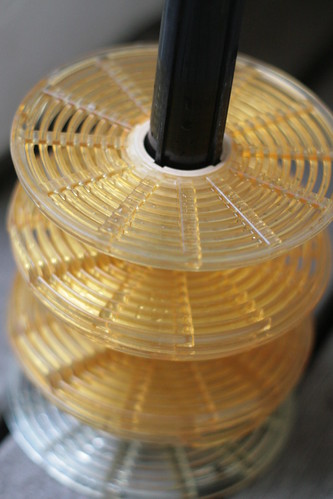
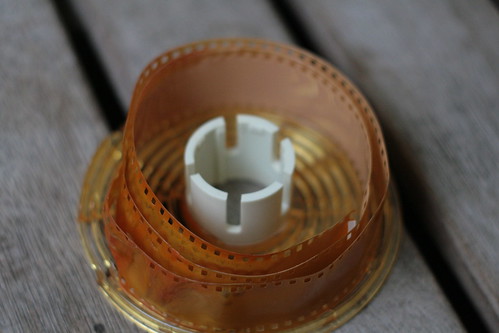
Anyway, the reels I used in the tank (apart from bottom one, which was touching acidic+oxidising solution) have bromine deposits, as did the film.. which was kinda half melted somehow. Awesome!

I'll try bromine chlorine first.. as it's a gas at the working temps I use, rather than bromine which has a boiling point of 58.8 C (above my working temps, hence it will deposit back onto surfaces at room temp). Though I'd love to try Iodine bleaching as a method of not only removing fog, but restoring ancient film to full speed, and even increasing speed depending on iodide content already in the film.


IMG_0180

IMG_0179


My Theory On Gas Bleaching:

My theory with gas bleaching is that I can rehalogenate silver to silver halide with a gas bleach.

You can do this in solution with a bleach, but this will wash out sensitising dyes, anti-halation layer, and other things, which reduces film speed and film spectral sensitivity.

With gas bleaching, that stuff stays where it is, hence you can potentially recover full film speed, or even potentially increase film speed of both b&w and colour film that has been fogged due to age, or film that has been pulled out in the light.

You could go so far as to leave film out in the sun to reduce to finer silver grains, and gas bleach back to silver halide, for a much finer grained (and very high resolution!) slow speed high contrast film - this can be applied to colour films too!

It doesn't take much halogen gas at all, so it can be performed in a film tank easily to sit in a small amount of gas, bleaching goes by very fast from what I can see.

More testing is needed.

Wednesday, June 29, 2011

Colour Print Film Split Bath Experiment Part 1

Okay,

So I got 1000ft of Vision Print Film I intend using for pictorial purposes. It is process ECP-2B, which is CD-2 based, I have dry CD-2..

As Jon Irenicus would say; "It is time for more... experiments. The pain will only be passing; you should survive the process."

This is the third test and first one worth showing.

The recipe I used is as follows;

Bath A:
7g/L CD-2
9g/L Sodium Sulphite

Bath B:
40.5g/L Sodium Carbonate
1.0g/L KBr


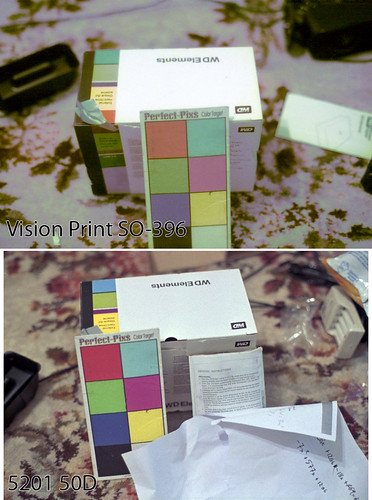
Both images shot in unfiltered heavy indoor tungsten.

The 50D ain't too bad, the density range for the layers on the 50D is right in the middle, a little thin on the range but pretty reasonable, of course it's a real low contrast scene and low contrast film, it would probably excel for a high contrast situation outdoors.

On the print film, all the layers have a wide range, cyan and magenta have the lowest dMin starting at nothing basically, but the range is pretty good, dMin and dMax together should be higher for better quality, dMin is slightly high on the yellow layer, and dMax a bit too high.

Future tests will increase the amount of CD-2, KBr, and I would add KI if I still had some.. would be very nice to. Oh well, benzotriazole and phenidone in Bath A are also on the list.

Once I get a good formula, I may compare it to a CD-3 version instead (ECP-2 is CD-2 based, ECN-2 is CD-3, E-6 is CD-3, C-41 is CD-4) to see the difference on the print film (ECP-2 film).

Print Film Test #3

Monday, June 6, 2011

Film Re-cycling Experiments Part 1.

After ripping out 70 odd ft of Vision1 500T (15 years old) out of a bulk loader and sitting it on my floor in the light (to make room for new Vision2 50D and Vision3 500T for bulk loading... still got another 700 ft of Vision1 500T in cans), I thought of something to do with it.

Cut some of it up, loaded it in a tank, processed it in some Xtol, now then I chilled a weak solution of potassium ferricyanide and potassium bromide to bleach the film back to all silver halide (just silver bromide) slowly to make a high contrast, fine grain, slow speed b&w film.. though I can try putting it through C-41 to get the CMY dyes (wont be a real colour image, but can treat it as a b&w during scanning for chromogenic b&w for IR dust removal), or just regular b&w processing.

The stuff still in the can and old expired film sitting around I have that's now shitty quality (Kodak Gold 100 from 2000), I can try just bleaching the fog (specks of elemental silver) away back to silver halide to restore the speed and denisty range.

If I want to keep it as useful colour film, that will have to be gas bleaching, so that it doesn't wash out the anti-halation layer and the spectral sensitisation dyes etc.

I also figured I could bake some film out in the sun until it is all reduced to metallic silver, and gas-bleach it back to silver halide for a high contrast, fine grain, slow colour film.

Saturday, April 30, 2011

Kodak Australia Helpful

Left a message on the Kodak site U.S. asking the difference between 5219 (Vision3 500T, http://motion.kodak.com/US/en/motion/Products/Production/Color_Negative_Films/5219.htm) and 5230 (500T, http://motion.kodak.com/AU/en/motion/Products/Production/Color_Negative_Films/5230.htm) as it was newly listed with a newer data sheet.

Received a phone call from a Kodak Australia rep (Fuji Australia last year or the year before I had to chase down numbers which most were no longer working it seemed..) explaining that 5230 is basically Vision2 (iirc) and lower cost and aimed for TV dramas etc etc. with a more limited format size and length range. He was quite helpful and enthusiastic

5219 is still the latest and greatest 500T. It comes in 100ft spools.. so it's ready to bulk load, so I dont have to buy a 400ft core and rewind by hand into a bulk loader.. which takes some damn time last time I tried.

50D comes in a 200 ft core at the smallest size.. which isn't too bad, I'd like to try that too.

And also 1000ft of 65mm.. to trim down into my saved up 120 spools and paper.

Monday, February 28, 2011

New Portra 400... overexposed 5 stops?? ISO 12.5??

Hmmm.

So on one of our photowalks in Melbourne city, I incident metered for the shade, as most of my subject as in the shade and wanted to optimise exposure for my subject, this is an extra +5 stops compared to a subject in the sunlit areas... yet it handled this mixed shade/sun combination beautifully, and flattened out the lighting contrast and did not get too dense, tones are reproduced beautifull for subjects both in shade and sun, it handles such a extreme harsh contrast condition wonderfully.. I have midtones for both!

The New Portra 400.. it has fine grain.. it is very sharp, it has wonderful saturation, and a ton of local contrast snap, very good skin tones.. it is high speed.. it is pushable.. it handles overexposure, it retains highlights, it can compensate high contrast with increased exposure without pull-processing.. if you had to have only 1 colour film, this would be it, forget Ektar, you can do everything with this.

If I was shooting for the sunlit area.. you would call this an EI of 12.5! This isn't a pull-process either, it is standard.


First 10 people in Australia to Like my services page, get free C-41 processing and web size scanning of a single roll of 35mm or 120, includes cross-processing and an pull/push you wish to have done.
http://www.photodan.com.au/services.php

Portra 400 pushed to 1600

New Portra 400 pushed to 1600.. that's 4 minutes 15 seconds in C-41 developer :)

This new film is beautiful and it handles excellent at 1600.. as long as you push it though!

Though there is invariably going to be a couple of times when a bit of underexposure will be introduced, so perhaps a push to 3200, but using an EI of 1600 for exposure would be best, or push to 1600 with an EI of 1250 or 1000 even better.

Portra 400 @ 1600

First 10 people in Australia to Like my services page, get free C-41 processing and web size scanning of a single roll of 35mm or 120, includes cross-processing and an pull/push you wish to have done.
http://www.photodan.com.au/services.php


Portra 400 pushed to 25600


Pushed 6 stops. 7 minutes and 30 seconds processing time in Flexicolor C-41 at 39 degrees celsius.

Density range is thin, image is poor, and lots of scanner noise present. It's at this point several things spring to mind:

1. Use a fast lens to begin with (well I just need the $ for that Mamiya 645 80mm f/1.9!)
2. It's at this point, the mercury vapour and hydrogen peroxide latensification looks attractive.
3. Perhaps a tiny pre-flash.
4. A "pre-developer" if you will for about 1 minute or so, phenidone-ascorbic acid speed enhancing developer, long enough to begin to have action, without making a visible image, just to amplify the silver image a bit, in case C-41 can't discern as low intensity sites as a speed enhancing b&w dev can. Which then can be then processed through C-41 after.
5. Rehal processing, after bleaching, instead of fixing, run it through C-41 again to increase dye gain.
6. Combine hydrogen peroxide with a colour developer or C-41 during development to gain more dye yield.
7. Combine points 2 through 6.

Anyway, here is one of the images, probably the best off the roll. I do not recommend this. A push to 6400 might be doable to a good quality, the 3200 results I've seen online are quite good, I think a push to 6400, but shot with an EI of 3200 might be best though.

First 10 peoplein Australia to click Like on my services page get free C-41 processing and web size scanning for any 35mm or 120, including cross-processing and/or push/pulling (still need to get your film to me and provide return postage if you're not local).
http://www.photodan.com.au/services.php


Tuesday, January 4, 2011

Fucking Irritated

Update: Dumb bitch tried to sign me up to another eyeka account replacing one of the letters in my username with a number after she changed my details to her email (again), fucking fraudulent trying to sign someone else up... thankfully it looks like it needs to be activated first before it'll stop you using the same email for another account.

I've told her several times that the account belongs to me and is mine, that she can stick the video on her own fucking profile.
 
Update: Back to pissed off, "you'll be hearing from our solicitor", ah fuck off. What a fuck tard.

Update: Let me just say they are completely fucking unprofessional, they just tried taking the account again.. apparently if you've logged in to the site and your session hasnt expired.. even if the password was changed from a different login session on another computer.. you wont have to enter the password on the other computer, you're session is still good to go as is.. how insecure.

I'm going to have to stay on top of this..


Alrighty,


Since I was doing pretty much nothing in the way film (as in motion picture/video, I decided to find others to work with or for, even if it would be pretty basic it would keep me doing something and making contacts at least.

Anyway, I ended up filming and editing a commercial for a competition, for Carmen Hopkins of  "Angelgazers Film Productions", which was in Ballarat, and I finished off the colour grading and some sound replacement and syncing at home (I'm in Melbourne).

Uploaded it to vimeo with a password for a preview, approval,  asked if she had an account or if I should create a new one, so I create a new one like told (Captain Hindsight informed me I should have not made it as I was registering my own account.. but force of habit whe signing up to things.. and I still had to use my own email to activate it) then uploaded before the dead line to the competition site (dead line is now extended to March I believe).

Anyway so today she wanted to add that it was by "Carmen Hopkins of Angelgazers film productions", that's fine, I added that, they asked for the username/password so they could update it at will if needed, fine, so I changed the password to something  random they could use (as I dont want to give out my own personal password that I create and remember etc).

Well about 10 minutes later I get another call being angry at me for stealing their work and passing it off as my own. Rude. I had added that it was by "Carmen Hopkins of Angelgazerz film productions" in the description.

After the call, I checked the page, and they had deleted my other work I had added to my profile, changed my profile to be in her name, and changed the email address. Wow, just fucking wow. They had done all that before calling. Talk about burning bridges and being unprofessional. I'm certain now they intended this when asking for the username/password.

Of course I quickly changed the email back to mine and changed the password again, then fixed my profile up.

If you're going to steal someone's work you dont put in who it's actually by.

If I wanted to be as unprofessional as they have acted I would simply delete the video and replace it with a rickroll.

I've left the video on there, and made it even more explicity clear who it's by, and who did what. And that to ask for her if it happens to win. I left her contact information intact on my profile (phone/mailing address) which I hadn't filled out as I didn't notice it as a requirement if you ended up winning so you can be contacted. Anyway I left that info on there so she can be contacted, as I am not reciprocally unprofessionl.

Captain Hindsight also says that she should have given me her profile login in details to put it on hers in the first place, since she actually does have an account on there since there is a comment from her on the video.


Yes, so I was quite mad, the username is my identity, not to be associated with someone else, and it doesn't matter anyway as it's so damn unprofessional.

Anger subsided to merely being highly irritated once I made sure my account is now safe from being vandalised again.


If you have Googled this

That means you might have spoken to them and will be collaborating with them on some fashion.

This situation could have been avoided with more organisation, and well, foresight on my part (never hurts) as opposed to hindsight (:P) to avoid issues. But it was completely the fault of their unprofessionalism, I won't tolerate the actions they took, then calling me to make angry accusations, and then saying "thanks for all your hard work on the ad" nicely and hanging up like they've got what they wanted anyway now that they had control of the account.

If you're going to be shooting or editing for them, be aware you'll/they'll most likely still be shooting with the same camera.. which is a horrifying SD camera with no manual focus, no manual exposure.

You can point it where you want to get right exposure and then lock the exposure.. but it also locks the focus.. no autofocus or touch screen zone focus.. completely locked together.

The image resolution is well below the maximum potential of SD, the compression is lousy and has a lot of artefacts, and the signal to noise ratio is poor. Grading half-decently will be exceptionally hard without further degradation of the piture.

Also it'll all be relying on available lighting, and no sound recording really (apart from inbuilt on the camera).
Sunday, January 2, 2011

Canon dSLR, simple detail & moire solution for 1080p


Au revoir moire, Sayonara jaggies, Hello detail.


I do not know what this didn't occur to me earlier (of course it may have occurred to someone else earlier, I just haven't read about it - but have read a lot of complaining or wishing for fixes in Magic Lantern for things like this).

Moire and lack of detail and jaggies occur in the Canon dSLR videos because there is no down scaling algorthim (sucks), meaning you end up with 1920x1080 straight pixels from the massive resolution sensor, no accounting for the gap between the pixels.

Quite like a nearest-neighbour down size in photoshop.

Well, you can fix this with an optical blur filter, to put the details out of focus... wait there is merit in this.

Even crappy lenses are too sharp for nearest neighbour down sized 1080p video off a high resolution sensor.

If the sensor was actually 1080p there wouldn't be (much) of a problem with that.

You want to enlarge (put out of focus) image detail over the sensor so you don't have a bunch of missing spatial detail thats gone flying out the window with all the other pixels being thrown out. Similar to an AA filter in the camera for stills.

To demonstrate this I have prepared a still image from a 5D II (shamelessly stolen test image from dpreview), cropped a section that seemed good, and downsized to the same factor as 1080p would be (5616 / 1920) using the nearest neighbour 'filter' (no filter, raw pixels grabbed and others chucked out), bicubic filter, and lastly, one with a gaussian blur of 1 pixel (seemed to be most appropriate size for this test) and then downsized using the nearest neighbour method (as to emulate the 5D II + some kind of softening filter on the lens).

Images are then enlarged to 200% for pixel peeping purposes.

You will have to view/download the full image to see the differences, I made it all as one image for convenience, no sharpening has been applied.

I think that a full-sensor sampling in-camera then a gaussian blur or fast blur, then nearest neighbour down size would actually be pretty damn good - because we're not losing detail, but this also blurs the noise, and would have significantly better noise characteristics @ 1080p.


Given the real detail level of the 5D II 1080p video is at or just above 720p (if you don't believe me take a still of the sharpest 1080p Canon video and downsize it using bicubic filter in Photoshop to 720p or just above, then back up to 1080p and see if you can spot any detail loss), I think that the detail loss is due to the way the image is sampled (similar to nearest neighbour) which loses detail, that is it chucks out the gaps between what it keeps, which creates moire, jaggies, etc, further detail is lost I believe in the compression of the jaggies.

So I believe the right softening filter on the Canon dSLRs may increase the detail level present, along with removing moire and jaggies.

(Update: No I do not think a diffusion filter will work well, it's overlaying the origina sharp image with a soft one to reate the diffusion, you want a just a soft filter with no diffusion, a solid peace weakish soft filter I'd think)


Friday, December 24, 2010

Infrared Sensitisation of Film

So I have some Tri-X (Arista  Premium 400) loaded in a patterson tank I presoaked in water, then soaked in a pigment that has a certain amount of IR absorption.

Now the film is drying in the tank and will be re-loaded into a reloadable 35mm canister.

Hopefully there'll be some pigment adjacent to the silver halide, and hopefully the pigment will be able to transfer energy to it.

I'll be shooting it with an R72 filter, focussed visually on a ruler for test shots, looking for a focus shift on the ruler.

Thursday, November 18, 2010

C-41 Infrared Test #1

C-41 Infrared Test #1

I figured just like with digital cameras, in a consumer product you can't remove all susceptibility outside the visible spectrum, just have several stops of difference in sensitivity.

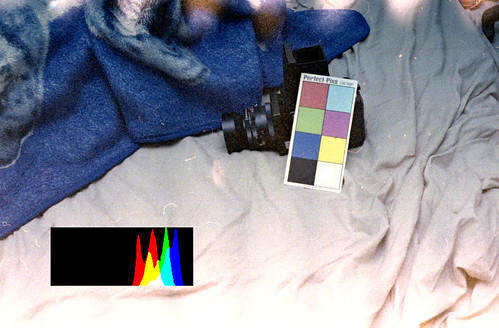
R72 Filter used, +14.5 stops of 'filter compensation' to get this effect, or EI 0.017 from a ISO 400 film (I should mention this included 2 stops of reciprocity correction, but its just guess work at this point).

Exposure was f/2.8, 15 seconds, correct unfiltered exposure was f/11, 1/400th.

I was considered lowering the pH level of the C-41 developer to effectively underdevelop the reds, but the reds dont seem that dense as I suspect they would be, they seem quite godo, but the green and blue channels have a thin density range.

Needs more exposure, with a green and blue filter, would probably help a bit.

Defniately seems to be an IR effect their to my eyes.

Film was ISO 400 35mm cheap unknown brand film, unknown age.

Scanned with levels set on each colour channel to not have any clipping at all, then auto-levelled to provide a 'balanced' image (regardless of false colour) to see the effect.

Test #2 will include the colour filters and increased exposure.

A high contrast film may be much better for this, less expansion of green and blue would be needed, hence less grain contrast, and less shitty scanner noise, perhaps Velvia etc.

Thursday, October 28, 2010

CuSO4 Bleach vs Flexicolor Bleach Test #1

Okay again... poor choice of shitty unbranded unknown 400 ISO old expired C-41 film leads to crappy results

Top is CuSO4, bottom is Flexicolor.

2min 45 sec in Flexicolor C-41 (38c), EI 50 (was intending +3 EI and N-2 dev.. not sure that worked out given the density)

This test though does prove Copper Sulphate Bleach WORKS, and the colour seems fine.

The density may seem similar overall, but each individual channel on the CuSO4 bleach is broader, though its a different image of course.

Anyway, density on both is so close to the end of the scanner range, that is normally clipped by 'max' levels, becomes hard to correct colour.

In any case, film is fogged, too much exposure also I guess for 2min 45sec.

But if the CuSO4 didn't work as a bleach, then there would also be a silver neg image on the film (which you could see by eye if there was), AND the density would be even greater, when max density is about the same as Flexicolor, differences due to exposure.

Other indications CuSO4 works: Back of film turns green/blue in bleach like its supposed, and you can see the image on the back of the film before fixing like it's supposed to as well.

Test needs to be re-done with fresh film, normal exposure and development.

But a big tick so far for CuSO4.

Bleach recipe used (I only mixed up 100mL in a beaker for a single frame):
100g/litre Copper Sulphate
100g/litre NaCl (I used table salt, whic his sea salt + anti caking agent since thats all I had - is fine).

You're supposed to filter or decant it as well, but I didn't.

According to literature I have, the shelf life is supposed to be 12 months or more (copper sulphate and salt aint going nowhere!), and the capacity is supposed to be 5 x 36exp 35mm rolls per litre (I'm sure it'd be more like other bleaches).

Bleaching time is alleged to be 6-7 min for film (C-41 and E-6) at 24 degrees celsius (I walked away and left both for 17 minutes as I forgot about them).

For paper (RA-4) its alleged 3-4 min at 24 celsius, and allegedly can do 30 8x10 prints a litre.


CuSO4 Bleach vs Flexicolor Bleach #1

C-41 1+9 Stand Test #1

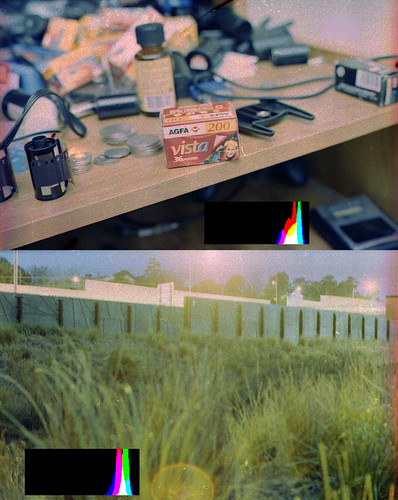
Okay so basic test was, Flexicolor C-41, diluted in to 1+9, and about ~1.2mg/litre of potassium iodide added. A while back Daire Quinlan tried a C-41 1+9 stand development, I decided to expand the idea in the search for various ways for good quality processing of C-41 at 20 degrees celsius (harder than it sounds).

Processed at ~20 degrees celsius, for an hour, pure stand iirc.

I was going to adjust pH to put it around 10.2 or so, but then I thought stand development may have a compensating effect, which means the RGB densities shouldn't be too far off each other, and potassium iodide also is supposed to promote even layer development between layers.

I've included the original RGB histograms on top of the image so you can see the rough density for each channel, remember highlights to right on a histogram on negative films means denser, and to the left is thin.

The results are dense with a thin range, (dMax close to dMin for each channel), however, it's actually better than normal C-41 processing at 20 degrees celsius in this regard. Also some of the density may be attributed to the uneven developed areas which were denser as you can see (blown out or very bright as I corrected to the main part of the image).

But, with agitation it should prevent uneven development, but that density shall still... so the solution is shorter time... or  more potassium iodide, I think I will try more potassium iodide.

Another word on the density... it was very old no-name (unknown) brand 400 ISO film I got for 50 cents a roll at a fair, also overexposed, so there is base fog to it, so I feel dMin would be lower (good) with fresh film

Also grain is actually normal ocompared to regular proces C-41 with this film, where as Daire Quinlan experienced increased (excessive?) grain, may be a result of the potassium iodide I added, but it should be confirmed with fresh and good fine grained film.

Test #2 will increase the potassium iodide and increased agitation (probably at 20 minute and 40 minute marks), I am not sure how much to increase it by, perhaps 4x.

The goals are to get even development, a little less density, and much lower dMin.

C-41 1+9 Stand Development Test #1

Friday, October 22, 2010

Trying Rodinal Reversal / "E-6" Again.

Attempting Rodinal Reversals for colour film again... trying with C-41 first off for cheap testing to start with.

Specifically right now I'm half-way through a 1+100, 1 hour stand on some Supra 400 I had shot (probably random stuff) a while back to see how it turns out.

This time I have made additions of Potassium Iodide and Ilford Rapid Fixer (Ammonium Thiosulphate), I do have some sodium thiocyanate, which is typical in E-6 first developers, but I hope this is enough, or I'll try again with an increased amount.

Update: Nothing on that roll, will have to shoot another roll tomorrow for testng.

Update: Some advice from Photo Engineer of APUG - "Well, Ammonium Thiosulfate is not good. The Ammonium ion is also a fixing agent and fogging agent to some extent and should not be used in developers as a general rule. You should only use Sodium Thiosulfate in this instance or Sodium Thiocyanate. The Thiocyanate is often used but you will again have to work out the amount needed."

Sunday, October 10, 2010

Things to try

Been in Melb for 6 weeks now...


Got a few things to try... pull-processing C-41 film, which I've already done in Rodinal and re-developed to colour before.. though that was 14 stop pull... good for daytime long exposure with no filters.

Got some old ISO 400 film that seems a bit crap and foggy at 400... though I did accidentally overdevelop it. Anyway, expose it at EI 50 and develop for 2 min 45 sec is the plan to see how it comes out.

Some bigger pulls with shorter times or C-41 with a 1+1 or 1+2 dilution and EI 12 and slower just to have a play.

Need to find some HCl from a pool shop to finish my concentrated 2 part colour negative developer.


Also got a roll of Rollei Pan 25 to test out.. not sure what to actually use it on though is the problem.


I want to try some Ektar 100 in 35mm lab-developed, and developed 'normally' (EI 100) in my concentrated developer (1+1+50), and pulled to EI 25 (1+1+100), with 8000 dpi Flextight 848 scans - just to ascertain differences.


The unbranded 400 ISO C-41 film shot @ EI 400, developed 3 min 45 sec accidentally and not agitated much (2 stop accidental push, was very dense and crappy), developed in Kodak Flexicolor at home, colour corrected (since it's C-41, posting orange negatives would be kinda odd).


Thursday, September 16, 2010

New Portra 400 film


New Portra 400 announced - http://www.kodak.com/global/en/professional/products/films/portra/400main.jhtml

Images - http://canlasphotography.blogspot.com/2010/08/film-is-not-dead-san-diego-v-20-day-3.html
http://www.facebook.com/album.php?aid=213771&id=87452556121


Replaces both 400NC and 400VC, it has the contrast of NC, it uses improvements from the Vision ECN-2 motion picture film line with saturation between NC and VC, finer grain and greater resolution (sharper) apparently. It wil lbe avaiable in 35mm 36exp, 120 roll, 220 roll and 4x5 sheet film (no 8x10).

400NC and 400VC are expected to be available until December 2010.

Given it's finer and sharper characteristics and low contrast, I look forward to treating it like Tri-X (yes yes, completely different film, but still..), I would like to try Rodinal 1+100, 2 hour semi-stand first dev (EI 6400 for Tri-X), and colour rehal dev, and also a custom colour developer for pushing, just to see.

My thoughts is that this is a 400NC replacement with improvements, 400VC also appears more vivid than 400NC because of its greater contrast, the new 400 retains 400NC's contrast with greater saturation, but shouldn't appear so vivid.

If you cant do without 400VC, buy up, and an extra freezer to stick it in.

Thursday, August 26, 2010

Colour Negative Developer Update

Okay so I think I've cracked the highly concenrated and dilutable colour negative developer.

I'm getting the or rather a correct pH (~10.22 @ 17.4 celsius test temperature in initial tests) of a test solution of what is a 1+100 dilution, or rather a 1+1+100 dilution since the developer will come in 2 parts.

I'm moving to Melbourne on Wednesday afternoon next week so I hope to do some test runs of the developer that week.

Friday, August 6, 2010

"Meter for the shadows"

Backlighting can be very pretty, as long as you bring extra light to light the front or side of the subject etc.

Film users often to say meter for the shadows and expose for that, you can develop normally or develop for highlights after that depending on the case.

Well I'm not doing a little roundup test, with Shanghai GP3 and Kodak Ektacolor Pro 160 to start with.

Of backlit objects, normal incident reading/correct exposure in the key light (direct sun), and then also an incident reading of the shade of the backlit object, both of these exposures also made on a 30D for digital reference.

First I will see how the GP3 holds up in these situations in a Rodinal stand for 1 hour, if the highlights are too dense, then dilution will be increased or time decreased.

Then I will see how the Ektacolor Pro 160 holds up in regular C-41 development, then split bath development, and then also finally stand developing in Rodinal for an hour (and rehal developed back to a colour negative).

Monday, August 2, 2010

Looking for work

I'm currently looking for work, so I can fund more film and chemicals, and more cameras. Well, and of course rent and food.... but that's lower priority ;)

I had an offer from Owen from David Hawk English School, who posted me a contract and can sponsor me for a VISA for teaching English in Zhongshan, about 130km west of Shenzhen iirc.

I'm unsure whats best for me to do.

Whether I should take that, hold out for other offers, or try to find an offer from Japan, or simply pack up all my crap into storage and stay at a hostel in Sydney while looking for anything (such as night fill), though I'd be giving up shooting film mostly, and I'd probably need to get some kind of laptop which is more expense..


Blah.

Friday, July 30, 2010

Mamiya RB67 ProS Repair Manual and Parts Catalog

A kind internet user has emailed me both the parts catalog and repair manual/sevice instructions for the Mamiya RB67 ProS, I previously scoured the internet for these but could not find either.

So I am making them available here for all film users, enjoy.

Service Instructions for Mamiya RB67 ProS
https://docs.google.com/fileview?id=12CM_sA3yELlU4ek6n7e5QCF7yAZjnOOo4zicWgWWc0ewuMDfm-9P8zGGmjPV&hl=en&authkey=CIH7t-0M

Parts Catalog for Mamiya RB67 ProS
https://docs.google.com/fileview?id=1zH6tCMpny0AnZvulZzEkjiy1eHmDWBve0K70pH7CFWjvoLpem_sYmOaRTDw0&hl=en&authkey=CLaQ9eoC